
Download Insightmonk – Deep Tech Market Intelligence Platform Review
Intro & Overview
Insightmonk is a niche market‑intelligence platform built specifically for the fast‑moving deep‑tech ecosystem. Powered by BIS Research, the service aggregates and curates detailed reports across cutting‑edge sectors such as artificial intelligence, digital health, advanced materials, aerospace, smart agriculture, and energy management. The platform’s core promise is to give strategists, investors, and R&D leaders a single gateway to high‑quality, sector‑specific insight that would otherwise require months of manual research.
Users gain access to a global network of subject‑matter experts, can run precise queries through the GPT‑4‑driven Insight Navigator, and explore specialized topics like space‑based edge computing or orthopedic imaging. While the platform delivers deep, well‑structured insight, it does not offer real‑time data feeds, custom‑sector onboarding, or a mobile‑first experience. Subscriptions are sold on a yearly basis, with pricing disclosed only after a sales conversation, and the product currently lacks built‑in trend‑prediction algorithms.
In this review we will break down what Insightmonk does well, where it falls short, and whether it justifies the investment for technology‑focused strategists, investors, and R&D leaders. By the end you’ll understand the value proposition, the user experience, and the exact steps you need to take to start leveraging this tool for competitive advantage.
Core Features & Capabilities
- Sector‑Specific Report Library: Over 500 downloadable PDFs covering AI/ML, digital health, advanced materials, aerospace, smart agriculture, and more, each authored by seasoned analysts.
- GPT‑4 Powered Insight Navigator: Natural‑language search that returns the most relevant sections of reports, saving hours of manual scanning and allowing users to ask complex, multi‑domain questions.
- Global Expert Community: Direct Q&A access to BIS Research analysts and industry thought leaders for clarification, deeper context, and occasional live webinars.
- Interactive Dashboards: Visualisations of market size, growth rates, and competitive landscapes that can be exported to PowerPoint, Excel, or PDF for stakeholder presentations.
- Cross‑Reference Engine: Ability to link related topics across different sectors, e.g., connecting AI‑driven drug discovery with advanced materials for biomedical devices, fostering interdisciplinary insight.
- Secure Cloud Storage: All reports are stored on encrypted servers, ensuring confidentiality for enterprise users and supporting role‑based access controls.
- Regular Quarterly Updates: While not real‑time, each report receives a quarterly refresh to incorporate the latest published data, market events, and analyst commentary.
- SSO & Identity Management: Integration with SAML 2.0, Azure AD, Okta, and other identity providers to streamline user provisioning and comply with corporate security policies.
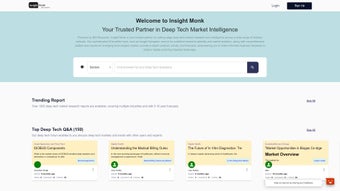
The feature set positions Insightmonk as a “one‑stop shop” for deep‑tech market intel, especially for teams that need a blend of rigorous research and quick, AI‑assisted retrieval. The platform’s UI is clean, with a left‑hand navigation pane that categorises content by industry, technology, and geography. The Insight Navigator stands out as a true differentiator; users can type natural language queries like “What are the emerging use‑cases for quantum sensors in aerospace?” and receive a concise answer backed by citations from multiple reports.
The cross‑reference engine further amplifies value by surfacing hidden connections between seemingly unrelated sectors, a feature rarely found in conventional market‑research tools. However, the lack of a native mobile app means analysts are tethered to a desktop environment, which can be a drawback for consultants who travel frequently. Overall, the combination of depth, AI‑enhanced search, and secure collaboration tools makes the platform compelling for organisations that prioritise thoroughness over immediacy.
Installation, Compatibility & User Experience
Insightmonk is delivered as a web‑based SaaS solution, so there is no traditional “installation” process. After purchasing a subscription, a sales representative provides a secure login and a short onboarding walkthrough. The platform is fully compatible with modern browsers—including Chrome, Edge, Firefox, and Safari—on Windows 10/11 and macOS 12+. Because it runs in the cloud, there are no heavy client‑side requirements; a minimum of 8 GB RAM and a stable broadband connection (≥5 Mbps) are recommended for optimal performance when rendering large PDF files and interactive dashboards.
For organisations that prefer a more controlled environment, Insightmonk offers SSO integration via SAML 2.0, allowing IT teams to manage user access through Azure AD, Okta, or similar identity providers. Data privacy is handled in accordance with GDPR and CCPA, with all uploads and downloads encrypted via TLS 1.3. Users can also set custom permissions to restrict report access to specific departments or roles, ensuring that sensitive market intelligence stays within the appropriate business units.
The onboarding experience includes a 30‑minute live demo, followed by a self‑service knowledge base that covers everything from creating custom collections to exporting visualisations. Because the platform is subscription‑only, there is no free tier, but a 14‑day trial is available on request. During the trial, users receive a limited set of reports (approximately 20) and full access to the Insight Navigator, giving a realistic sense of the workflow before committing to a yearly plan. Customer support is provided via email, ticketing system, and optional dedicated account managers for enterprise clients, ensuring that any technical or research‑related questions are addressed promptly.
Pros & Cons, FAQ & Final Verdict
Pros
- Deep, sector‑specific research compiled by reputable analysts.
- GPT‑4 powered search dramatically reduces time spent locating relevant data.
- Secure cloud architecture with SSO and GDPR compliance.
- Interactive dashboards and export options streamline presentation building.
- Quarterly updates keep reports reasonably current.
- Robust expert community provides direct access to thought leaders.
Cons
- No real‑time data feeds; insights may lag behind fast‑moving markets.
- Absence of a native mobile app limits on‑the‑go accessibility.
- Pricing is opaque; enterprise quotes are required, which can deter small teams.
- Lacks built‑in trend‑prediction or forecasting models.
- Custom sector support is not offered; users must work within the predefined categories.
- Trial access is limited to a subset of reports, which may not represent the full breadth of the library.
Frequently Asked Questions
Is Insightmonk suitable for small startups?
While the depth of research is valuable for any size company, the yearly subscription cost and lack of a free tier can be a barrier for early‑stage startups. A trial period can help assess ROI before committing, and some startups negotiate limited‑user licenses directly with sales.
Can I export data to other BI tools?
Yes. Insightmonk allows export of charts and tables to CSV, Excel, and PowerPoint. For deeper integration, users can download raw datasets (where permitted) and import them into Tableau, Power BI, or other analytics platforms for custom visualisations.
What security certifications does Insightmonk hold?
The platform complies with ISO 27001, GDPR, and CCPA. All data in transit is encrypted with TLS 1.3, and at rest with AES‑256 encryption. Role‑based access control and audit logs further enhance security for enterprise deployments.
Is there a way to request custom reports?
Custom research is not part of the standard subscription. However, BIS Research offers separate bespoke consulting services that can be purchased alongside the Insightmonk license, allowing organisations to commission tailor‑made analyses on niche topics.
How often are the reports refreshed?
Each report receives a quarterly refresh, incorporating newly published data, market events, and analyst commentary. Critical sectors may see additional ad‑hoc updates when major breakthroughs occur.
Does Insightmonk integrate with existing knowledge‑management systems?
Integration is limited to standard SSO and export functions. There is no native API for automatic ingestion into systems like Confluence or SharePoint, so users typically rely on manual export and upload workflows.
Conclusion & Call to Action
Insightmonk excels at delivering high‑quality, AI‑enhanced market intelligence for deep‑tech domains where data is scarce and expertise is hard to find. Its GPT‑4 Insight Navigator and robust expert community make it a compelling choice for corporate strategists, venture‑capital analysts, and R&D leaders who need reliable, sector‑specific insight without building an in‑house research team. The platform’s primary drawbacks—lack of real‑time updates, no mobile app, and opaque pricing—mean it is best suited for organisations that value depth over immediacy and can allocate budget for an annual subscription.
If you are ready to empower your decision‑making with curated deep‑tech intelligence, start by requesting a personalized demo from Insightmonk. Take advantage of the 14‑day trial to explore the Insight Navigator, assess report relevance, and determine whether the platform aligns with your strategic goals. Download Insightmonk today and unlock the knowledge that drives tomorrow’s breakthrough technologies.



.png)



